Frequently Asked Questions
Find answers to frequently asked questions.
Table of Contents
- Is it possible to migrate my data from Stripe to Tilled?
- What is the difference between a charge and a payment intent?
- How can I include the Tilled gateway within an iFrame and/or use Tilled.js?
- Can I customize the merchant onboarding experience?
- How are 401 error codes resolved?
- What are some examples of specific failure codes that we can simulate in Sandbox?
- I tried using the form method, but I keep receiving this error message: “Uncaught (in promise) TypeError: form.createField is not a function.” What is happening?
- What are the different user levels for production/Sandbox?
- Are my credentials for sandbox the same as for production?
- Is it possible to create a merchant account for a partner in production?
- Does Tilled offer tokenization to collect sensitive card or bank account details?
- Can I dynamically style Tilled.js iFrames?
- How can I use platform fees to monetize my payments?
- Is it possible to apply a surcharge to credit card transactions?
- What are the required billing details for a payment method?
- How can I vault my payment method with Tilled?
- How long is a payment method valid?
- Can my merchants share payment methods?
- Is there an example of Apple Pay?
- How can I successfully create an Apple Pay Domain for Tilled verification?
- Which countries does Tilled accept for payment processing?
- Does Tilled block traffic from any particular cloud service providers?
- Is it possible to update the expiration date on credit cards?
- Does Tilled have a mobile app (Android / iOS) SDK?
- Can merchants be registered with just an SSN rather than a TIN?
- How long does it take to process a refund?
- Are partial refunds possible on payments that are not batched?
- Is it possible to perform more than one capture with the same payment intent?
- Is it possible to retrieve customer transactions and reconcile items that are associated with a payout?
- What is the simplest way to make test payments?
- Are there any account or routing numbers that can be used for testing ACH transfers?
- Are there any account numbers,transit numbers or institution ids that can be used for testing ETF transfers?
- How long does a card settlement or batch take?
- Can I use Tilled to place a pre-authorization hold on a payment method?
- When does an uncaptured payment intent expire?
- How can I change the due date for a subscription?
- Can I update a subscription’s payment intent directly?
- Are Split Payouts possible?
- Does Tilled support OAuth or OAuth 2.0?
- Does Tilled have an OCR method to send credit card information?
- Which card brands are accepted by Tilled?
- How can I link a payment intent back to the subscription?
- How can I set up webhooks to receive a merchant’s status during onboarding?
- What descriptor will appear on a customer’s credit card statement?
- How can I view transactions per customer?
- Does Tilled have any examples of a React project using Tilled.js?
- Can I filter records by metadata?
- Does Tilled support 3D Secure?
- What steps can be taken to protect Merchants from fraud and chargebacks?
- What does the processing error code
PICKUP_CARDmean and how is it resolved?
Is it possible to migrate my data from Stripe to Tilled?
Yes! For more information read our Stripe data migration guide here. If you are migrating from another payment processor, reach out to our team at integrations@tilled.com for more information.
What is the difference between a charge and a payment intent?
A payment intent represents a payment’s whole lifecycle, from initiation to completion or cancelation. Charges, on the other hand, occur at the singular point in the payment process when a transfer of funds is initiated.
How can I include the Tilled gateway within an iFrame and/or use Tilled.js?
The Tilled.js API Documentation describes how to include a payment form in a partner’s application.
Tilled also offers a Simple Payment Example that incorporates Tilled.js into a website. You can see an example here.
Can I customize the merchant onboarding experience?
You can use Tilled’s Onboarding API to create custom onboarding forms. Tilled provides a GitHub project called Simple Onboarding Form as a roadmap for developers to customize the onboarding experience.
How are 401 error codes resolved?
A 401 error code indicates an issue with API keys. Take a look at our Error Code Library for an overview of common error codes that may be encountered while working with Tilled. If the issue can not be resolved, reach out to our team at integrations@tilled.com.
What are some examples of specific failure codes that we can simulate in Sandbox?
For our list of charge declines that can be simulated in Sandbox visit our Testing page here.
I tried using the form method, but I keep receiving this error message: “Uncaught (in promise) TypeError: form.createField is not a function.” What is happening?
The form method returns a promise rather than a form object. The browser engine is attempting to run createField before the promise has been fulfilled. Therefore, the method is not defined within the call’s execution context. Before you can access the form object’s methods, you must await the call’s return value.
What are the different user levels for production/Sandbox?
When creating a user, Tilled allows partner’s to choose from the following roles:
| User Role | Description |
|---|---|
admin | Best for business owners and company administrators. |
developer | Best for developers or people primarily using the Tilled API. |
analyst | Best for people who need full access to Tilled data, but don’t need to update business settings. |
view_only | Best for people who need to view Tilled data, but don’t need to make any updates. |
merchant_owner | Best for the business owners of merchants |
merchant_admin | Best for the company administrators of merchants |
Are my credentials for sandbox the same as for production?
No. Your credentials for production will differ from those you used in sandbox. Check that you are not utilizing the sandbox account id for production.
Is it possible to create a merchant account for a partner in production?
Payments can only be processed by merchant/connected accounts, not partner accounts.
As a result, a partner may request to become a merchant on their own account. This is a conceivable circumstance in production, and the partner must be notified that they must be onboarded as a merchant, which is a slightly different process.
Does Tilled offer tokenization to collect sensitive card or bank account details?
Yes, we offer a JavaScript library for tokenizing payments. For more information , see Tilled.js.
Can I dynamically style Tilled.js iFrames?
Tilled.js allows users to listen for and handle multiple events with the on method. Ex: field.on(event, handler): void. The on method supports the following events:
change: triggered when the Form Field’s value changes.ready: triggered when the Form Field is fully rendered and can accept input.focus: triggered when the Form Field gains focus.blur: triggered when the Form Field loses focus.
Note: For more information, see the corresponding section in our Tilled.js documentation.
How can I use platform fees to monetize my payments?
Tilled allows partners to specify a platform_fee amount when creating a payment intent, which is a fee that is deducted from the user and directed to the partner. Consider it a per-transaction service fee that users pay to partners. Platform fees cannot be greater than the total payment amount less fees.
For example, if a customer makes a $10 payment to a merchant with a platform fee of $1.00, the merchant would receive $9 and the partner would receive $1.00.
Note: For the sake of simplicity, this example ignores the merchant’s pricing.
Is it possible to apply a surcharge to credit card transactions?
Payment methods created with Tilled have a funding type included in the response card.funding property that can be used to determine whether or not the surcharge should apply. To apply the surcharge, calculate the new amount including the surcharge and update the payment intent.
Note: To determine the payment method ’s funding type, you will need to create the payment method separately and before the confirmation of the payment intent via Tilled.js or API.
What are the required billing details for a payment method?
Depending on the type of payment method, different billing information is needed. The table below can be used to check that the information you are passing is accurate.
| Type | Required billing_details |
|---|---|
card | zip, country |
ach_debit | city, state, street, zip, country |
eft_debit | city, state, street, zip, country |
How can I vault my payment method with Tilled?
When a payment method is entered into Tilled.js, the raw data passes directly into our vault, and Tilled.js returns a payment token to be passed in a call to our API. Tilled’s documentation may use the terms “vault” and “tokenize” interchangeably.
Note: A vaulted payment method will not persist in our system unless it has been attached to a customer. Please see the question below for more information.
How long is a payment method valid?
When a payment method is created, a created_at and expires_at value will be provided in the response.
A card has a 5-minute validity period, while an ach_debit has a 15-minute validity period. However, payment methods will not expire once they have been attached to a customer, allowing them to be reused in multiple payment intents.
Can my merchants share payment methods?
A customer created at the partner level may use a previously saved payment with any of your merchants.
When you create a customer or make any calls to the payment method endpoints, you must include your partner account id in the header parameters.
Is there an example of Apple Pay?
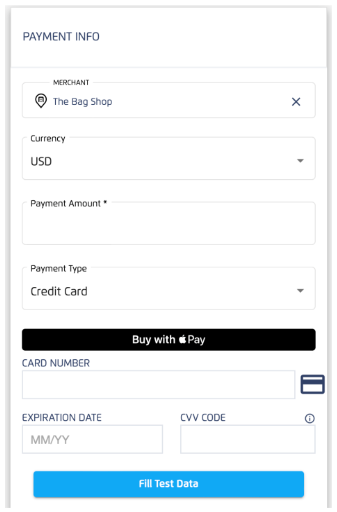
For code examples please see the PaymentRequest on Tilled.js.
How can I successfully create an Apple Pay Domain for Tilled verification?
You will not register the merchant using your Apple Developer account. We manage the process on our end when you utilize our Domain Verification File. Please follow the steps below to successfully create an Apple Pay domain for Tilled verification on Tilled:
- You’ll need an HTTPS-secured domain.
- Add Tilled’s Apple Domain Verification File to the
/.well-known/apple-developer-merchantid-domain-associationpath to your domain. POST /v1/apple-pay-domainswith your domainhostname: Example:"hostname": "https://example.com”- You should be able to proceed with the rest of the Apple Pay integration with Tilled.
For code examples please see the PaymentRequest on Tilled.js.
Which countries does Tilled accept for payment processing?
Payments can be processed by any country unless that country is on our banned list. Please reach out to integrations@tilled.com for the complete list.
Does Tilled block traffic from any particular cloud service providers?
Tilled accepts traffic from all major, reputable cloud providers. However, we also continuously monitor inbound network traffic for security threats and will block internet traffic from malicious origins as-needed. Currently the only provider we block all traffic from globally is Digital Ocean. If your applications or services are hosted on Digital Ocean, you can provision static outbound IP addresses in your environment and you can provide those to Tilled’s integration support team. We’ll then work with our security team to get your IP addresses allow-listed in our firewalls.
Is it possible to update the expiration date on credit cards?
At the moment, it is not possible to update a credit card’s expiration date.
Does Tilled have a mobile app (Android / iOS) SDK?
Tilled does not currently have any mobile SDKs.
Can merchants be registered with just an SSN rather than a TIN?
If they are a sole proprietor, they should be able to use it. As a general rule, for the following business types:
- Sole Proprietor/Sole Trader can use their SSN
- LLC, Corporation, or LLP will need a Federal Tax ID
- Charity will need 501c3
How long does it take to process a refund?
The status of a refund is typically updated around 7 a.m. ET. Refunds are processed the following business day unless they occurred after 5 p.m. ET.
Are partial refunds possible on payments that are not batched?
A partial refund is not possible until the charge has been batched. Charges from the current batch are processed automatically shortly after midnight ET. We propose that developers either initiate the partial refund after the midnight batch, for example, at 1 AM ET, to verify that all charges from the previous day have been successfully batched or cancel the payment by refunding the full amount and generating a new paymentIntent for the correct amount.
Is it possible to perform more than one capture with the same payment intent?
No, A payment intent can only be captured once even if the amount captured is less than the authorized amount.
Is it possible to retrieve customer transactions and reconcile items that are associated with a payout?
Yes, you will have to request to “List all balance transactions” and pass the payout_id in the query parameters. See the example below:
| Environment | URL |
|---|---|
| Sandbox | https://sandbox-api.tilled.com/v1/balance-transactions?payout_id=po_123abc |
| Production | https://api.tilled.com/v1/balance-transactions?payout_id=po_123abc |
What is the simplest way to make test payments?
We have included a virtual terminal in our partner console. Simply log in with your credentials, click on the “Developer” tab on the left hand menu, and navigate to the virtual terminal. Please see our Testing page for test card numbers and cvc values to simulate various responses.
Are there any account or routing numbers that can be used for testing ACH transfers?
When creating a payment method in sandbox, a developer may be required to enter ACH account and routing numbers. Routing numbers must be valid ABA routing numbers in order to successfully create the payment method, but any 12-digit number can be passed as an account number.
The following are some examples of well-known routing numbers:
| Bank name | ABA Routing Number |
|---|---|
| TD Bank Connecticut | 011103093 |
| TD Bank Florida | 067014822 |
| Bank of America | 011000138 |
| Wells Fargo Bank | 021101108 |
| HSBC | 021004823 |
Are there any account numbers,transit numbers or institution ids that can be used for testing ETF transfers?
Any 5 or 20-digit number can be passed as an account_number or transit_number, but the institution_id must be valid for the payment method to be created successfully. Several well-known transit numbers are listed below:
| Bank name | Bank Code (or institution number) |
|---|---|
| Bank of Montreal | 001 |
| Scotiabank (The Bank of Nova Scotia) | 002 |
| Royal Bank of Canada | 003 |
| The Toronto-Dominion Bank | 004 |
| National Bank of Canada | 006 |
How long does a card settlement or batch take?
The batch card settlement process ends a little before midnight EST.
A charge made on Monday at 8 p.m, for example, will be settled Monday night, just before midnight EST.
Can I use Tilled to place a pre-authorization hold on a payment method?
You must create a payment intent with the capture method set to manual to first create a payment intent with a status of requires_capture. From there, you capture it with the Capture a PaymentIntent endpoint.
When does an uncaptured payment intent expire?
Payment intents that have not been captured for seven days will be canceled.
How can I change the due date for a subscription?
The billing_cycle_anchor cannot be changed at any point during the subscription’s lifecycle. Tilled calculates all future payments from the initial date once the first payment is made. If the billing anchor needs to be changed, we recommend canceling the previous subscription and starting over with the new anchor.
Can I update a subscription’s payment intent directly?
Yes. However, updating the payment intent will not affect the subscription’s status. If the subscription has a status of past_due, users should update the subscription with a valid payment method and attempt to retry it.
Are Split Payouts possible?
Tilled supports split payouts in the form of platform fees attached to a payment intent, enabling split payouts between you, the partner, and the merchant account that generated the payment intent. Tilled does not allow split pay between multiple merchant accounts. For more information see the question on platform fees.
Does Tilled support OAuth or OAuth 2.0?
Tilled supports authentication using JWT. OAuth 2.0 allows for the use of JWTs as Bearer Tokens to encode all relevant aspects of an access token within the access token itself instead of storing them in a database.
Does Tilled have an OCR method to send credit card information?
Although we do not support OCR, there are third party libraries that can be leveraged. For example: card.io or Dyneti.
Which card brands are accepted by Tilled?
Tilled accepts, Visa, Visa Debit, Visa Electron, MasterCard, Mastercard Debit, Maestro, American Express, Diners, Discover and JCB.
Diners, Discover, and JCB are not supported in Canada.
How can I link a payment intent back to the subscription?
If you include metadata in your subscription request to query while retrieving payment intentions, the id will be listed in the subscription_id object.
Another approach would be to watch webhooks for the event payment_intent.succeeded, which includes the payment_intent_id and subscription_id.
How can I set up webhooks to receive a merchant’s status during onboarding?
Webhooks can be created through our Partner Console’s Webhooks page, under the Developer section, and the API. account.updated is the event to monitor.
| Onboarding Status | Description |
|---|---|
created | Merchant account has been created in Tilled. |
started | Merchant has started the merchant application. |
submitted | Merchant has successfully submitted the merchant application. Awaiting a response from Underwriting. |
active | Merchant is active for payments. This is the normal status after submitting. |
in_review | Underwriting is reviewing the merchant. Further documents may be requested by Tilled |
rejected | Underwriting has rejected the merchant. Tilled will provide reasons for rejection. |
For more information on webhooks, how to build them, and verifying their signatures, review our webhooks documentation here.
What descriptor will appear on a customer’s credit card statement?
The description submitted on the hosted onboarding form or via API (business_legal_entity.statement_descriptor) will show on a customer’s credit card statement by default. The descriptor can be dynamically updated by including a string for the statement_descriptor_suffix in a payment intent.
Note: The business_legal_entity.statement_descriptor value is NOT accessible once the onboarding application has been submitted.
How can I view transactions per customer?
A: To view transactions for a specific customer, you must have added an identifier using metadata within the PaymentIntent’s RequestBody. Following this, you would use the List all PaymentIntents query to query the transaction, adding the metadata to the URL Parameters. For example: https://sandbox-api.tilled.com/v1/payment-intents?metadata [KEY]=VALUE
You can also filter the result of the List All PaymentIntents call to the specific customer id (res.items.payment_method.customer_id === cus_XXXX).
Does Tilled have any examples of a React project using Tilled.js?
Yes, Tilled offers a working example called the React Payment Example. It makes use of the Create React App SDK for the frontend and Node.js for the backend.
More code samples are available in the Tilled Example Monorepo.
Can I filter records by metadata?
Yes, on the List operation for Accounts, Customers, PaymentIntents, Refunds, or Subscriptions, you can pass in a query parameter like this: ?metadata[membership_level]=gold.
Only exact matches are returned.
Does Tilled support 3D Secure?
Tilled does not currently support 3D secure.
Customers must perform an additional verification step with the card issuer when paying with 3D Secure (3DS) for enhanced fraud protection.
What steps can be taken to protect Merchants from fraud and chargebacks?
Merchants can take several steps to further protect themselves from fraud and chargebacks, from individual business security to additional due diligence on transactions. While there is no one-size-fits-all approach for Merchants, there are many ways a Merchant can stay confident in the security and validity of transactions they process. Read our guide to mitigating fraud and responding to chargebacks here.
What does the processing error code PICKUP_CARD mean and how is it resolved?
The processing error code PICKUP_CARD indicates the card may have been reported lost or stolen. The customer cannot use it to make a purchase.To resolve this the customer needs to contact their card issuer for more information. For more information on processing error codes visit our processing error code library.